What is it? Consumer Groups in Redis Stream is analogous to Kafka consumer groups. They solve the coordination problems we had with manual XREAD.
Key Features.
Independent consumer groups. Multiple groups can process the same stream independently
Automatic message distribution. Messages automatically distributed among consumers in a group
Pending Entry List (PEL). Tracks which consumer has which unacknowledged messages. Messages are added to PEL immediately when consumed via XREADGROUP (not after processing). Only messages consumed without NOACK flag enter PEL.
At-least-once delivery. Messages remain pending (in PEL) until explicitly acknowledged with XACK
Consumer failure handling. Can claim messages from dead consumers
Last delivered ID tracking. Group tracks progress automatically
2. Commands for Consumer Group
2.1.
XGROUP
XGROUP manages consumer groups: creation, deletion, and configuration.
Returns: 2 (number of pending messages that were assigned to worker-1)
These pending messages become available for other consumers.
2.2.
XREADGROUP
XREADGROUP reads messages with automatic distribution and tracking.
2.2.1.
Syntax
1XREADGROUP GROUP group_name consumer_name \
2 [COUNT count] [BLOCK ms] [NOACK] STREAMS stream_name ID
Parameters:
GROUP group_name consumer_name - Group and consumer identity
COUNT - Max messages to read
BLOCK - Wait for messages (milliseconds)
0 = wait indefinitely (most common for consumer workers)
> 0 = timeout in milliseconds
Omit BLOCK = non-blocking, return immediately
NOACK - Don't add to PEL (fire-and-forget, rarely used). By default, messages ARE added to PEL immediately when consumed
ID - Starting position
> = only undelivered messages (most common for new work)
0 = check PEL first (returns this consumer's pending messages)
Valid message ID (e.g., 1709251200000-0) = returns messages with ID greater than specified, including any that are in this consumer's PEL
Side Effect (When ID=> and COUNT > 0). In this case when we execute XREADGROUP to a consumer, the consumer has an internal state that records the last_id consumed.
The next time we execute XREADGROUP again the messages that are older than the last_id will be eliminated
Side Effect (When ID=>).XREADGROUP with ID=> consumes messages from the stream, redis also immediately adds them to consumer's PEL
No Side Effect (When ID=0) In this case XREADGROUP reads from the consumer's PEL, not from the stream directly.
The returned messages are already consumed but not ACKed.
Remark. PEL is a separate radix tree data structure tracking unacknowledged messages per consumer.
In this case we also say that we read the pending messages of a consumer.
2.2.2.
Understand PEL (Pending Entry List) Behavior
When XREADGROUP returns messages, they are immediately added to the consumer's PEL before any processing begins. This happens at the moment of consumption, not after processing. The PEL tracks unacknowledged messages and enables reliable message delivery:
Messages stay in PEL until explicitly acknowledged with XACK
If a consumer crashes, messages remain in its PEL for recovery
Use NOACK flag only when you don't need reliability (fire-and-forget scenarios)
Only messages that need acknowledgment enter the PEL
> means "give me new messages not yet delivered to this group":
1XREADGROUP GROUP payment-processors worker-1 COUNT 2\2 STREAMS orders:payments >
PEL Tracking. These 2 messages are immediately added to worker-1's Pending Entry List (PEL) the moment XREADGROUP returns them—before any processing happens.
They will remain in the PEL until either:
Successfully acknowledged with XACK after processing completes
Reclaimed by another consumer via XCLAIM (if worker-1 crashes or takes too long)
This immediate PEL tracking is what enables at-least-once delivery semantics: if the consumer crashes before ACKing, the messages remain in the PEL and can be recovered.
Consumer 2 reads (simultaneously):
1XREADGROUP GROUP payment-processors worker-2 COUNT 2\2 STREAMS orders:payments >
Here
worker-2 gets different messages (automatic distribution!)
Messages 1001, 1002 already assigned to worker-1
2.2.3.2.
Blocking Read with Consumer Group
By using XREADGROUP we (i) createworker-1 and (ii) listen to new messages to the stream at the same time:
1XREADGROUP GROUP payment-processors worker-1 BLOCK 30000\2 STREAMS orders:payments >
We can test by adding a new message in another terminal:
Note that group_name is required, this command only operates within the context of a consumer group.
2.3.2.
What is it?
XACK removes messages from the Pending Entry List (PEL), signaling successful processing.
XACKonly works with consumer groups. When using XREAD without consumer groups, there is no PEL and no XACK command, we must manually track which messages we have processed.
XACKdoes not delete messages from the stream for potential reprocessing, auditing, or consumption by other consumer groups.
More specifically, even we have ACK-ed a message via
1r.xack('orders:payments',# the stream2'payment-processors',# the consumer group3 message_id)
Stream Storage: ACKed messages remain in the stream permanently (unless explicitly trimmed with XTRIM)
PEL: XACK only removes messages from the consumer group's PEL. We can verify the message is removed from PEL by checking:
1XREADGROUP GROUP payment-processors \2 worker-1 STREAMS orders:payments 0
If the message was ACKed, it will NOT appear in this result (because it's no longer in worker-1's PEL).
Different Read Commands See Different Views:
XREAD STREAMS orders:payments 0 - Reads ALL messages from stream (includes ACKed messages)
XREADGROUP ... STREAMS orders:payments 0 - Reads only unACKed messages from THIS consumer's PEL
XREADGROUP ... STREAMS orders:payments > - Reads new messages not yet delivered to consumer group
To actually remove messages from the stream, use XTRIM:
1XTRIM orders:payments MINID 1709251200100-0 # Remove older messages2XTRIM orders:payments MAXLEN 1000# Keep only last 1000
2.3.3.
Examples
2.3.3.1.
Complete Workflow (From Read to ACK)
Worker reads messages:
1XREADGROUP GROUP payment-processors worker-1 STREAMS orders:payments >
1import redis
23r = redis.Redis(decode_responses=True)45# Consumer loop6whileTrue:7# Read message8 result = r.xreadgroup(9 groupname='payment-processors',10 consumername='worker-1',11 streams={'orders:payments':'>'},12 count=1,13 block=500014)1516if result:17 stream, messages = result[0]1819# Check if there are messages (list could be empty)20ifnot messages:21continue2223 message_id, data = messages[0]2425try:26# Process payment27 process_payment(data['orderID'], data['amount'])2829# Success - ACK30 r.xack('orders:payments','payment-processors', message_id)31print(f'Acknowledged: {message_id}')3233except Exception as e:34# Error: Message stays in PEL for retry35print(f'Failed: {message_id}, Error: {e}')36# Will be re-processed when we check PEL
2.4.
XINFO
XINFO provides detailed information about streams, groups, and consumers.
1import redis
2import json
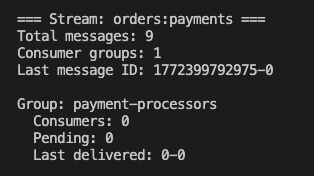
34r = redis.Redis(decode_responses=True)56defmonitor_consumer_groups(stream_name):7"""Monitor health of consumer groups"""8print(f'\n=== Stream: {stream_name} ===')910# Stream stats11 stream_info = r.xinfo_stream(stream_name)12print(f'Total messages: {stream_info["length"]}')13print(f'Consumer groups: {stream_info["groups"]}')14print(f'Last message ID: {stream_info["last-generated-id"]}\n')1516# Each consumer group17 groups = r.xinfo_groups(stream_name)18for group in groups:19 group_name = group['name']20print(f'Group: {group_name}')21print(f' Consumers: {group["consumers"]}')22print(f' Pending: {group["pending"]}')23print(f' Last delivered: {group["last-delivered-id"]}')2425# Each consumer in group26 consumers = r.xinfo_consumers(stream_name, group_name)27for consumer in consumers:28print(f' Consumer: {consumer["name"]}')29print(f' Pending: {consumer["pending"]}')30print(f' Idle: {consumer["idle"]}ms')3132# Alert if consumer is too idle33if consumer['idle']>300000and consumer['pending']>0:34print(f' ALERT: Consumer may be dead!')35print()
Output of the script:
2.5.
Error Recovery: Ensuring At-Least-Once Delivery
When exceptions occur during processing, messages remain in the PEL without being ACKed. Redis Streams provides mechanisms to ensure at-least-once delivery by retrying these pending messages.
How It Works:
Message consumed → Added to consumer's PEL immediately
Exception thrown → Message NOT ACKed, stays in PEL
Worker crashes → Message still in PEL (persistent)
Recovery → Read pending messages and retry
2.5.1.
Pattern 1: Consumer Checks Its Own PEL
Each consumer periodically checks its own pending messages:
1import redis
2import time
34r = redis.Redis(decode_responses=True)56defconsumer_with_retry():7"""Consumer that retries its own pending messages"""8whileTrue:9# Step 1: Check for pending messages first (ID=0)10 result = r.xreadgroup(11 groupname='payment-processors',12 consumername='worker-1',13 streams={'orders:payments':'0'},# 0 = check MY PEL14 count=1015)1617if result and result[0][1]:18# Found pending messages - retry them19 stream, messages = result[0]20print(f'Found {len(messages)} pending messages, retrying...')2122for message_id, data in messages:23try:24 process_payment(data)25 r.xack('orders:payments','payment-processors', message_id)26print(f'Retry successful: {message_id}')27except Exception as e:28print(f'Retry failed: {message_id}, Error: {e}')29# Still in PEL, will retry next iteration3031# Step 2: Process new messages (ID=>)32 result = r.xreadgroup(33 groupname='payment-processors',34 consumername='worker-1',35 streams={'orders:payments':'>'},# > = new messages36 count=10,37 block=5000# Wait up to 5s for new messages (prevents busy-waiting)38)39# Note: block=5000 makes the command wait up to 5 seconds if no messages40# are available, instead of returning immediately. This prevents busy-waiting41# (constantly polling in a tight loop), reducing CPU and network usage.4243if result:44 stream, messages = result[0]45for message_id, data in messages:46try:47 process_payment(data)48 r.xack('orders:payments','payment-processors', message_id)49print(f'Processed: {message_id}')50except Exception as e:51print(f'Failed: {message_id}, Error: {e}')52# Stays in PEL for next retry cycle5354# consumer_with_retry()
Key Points:
Use ID=0 to read pending messages
Check PEL periodically (e.g., every loop iteration or every N seconds)
Failed messages remain in PEL for next retry
Simple pattern for single consumer recovery
2.5.2.
Pattern 2: Dedicated Recovery Worker
A separate worker monitors and claims stuck messages from ALL consumers:
1import redis
2import time
34r = redis.Redis(decode_responses=True)56defrecovery_worker(max_idle_time=60000, max_retries=3):7"""
8 Dedicated worker that claims stuck messages from any consumer
910 Args:
11 max_idle_time: Claim messages idle for > this time (ms)
12 max_retries: Move to DLQ after this many attempts
13 """14whileTrue:15# Find ALL stuck messages across all consumers16 pending = r.xpending_range(17 name='orders:payments',18 groupname='payment-processors',19min='-',20max='+',21 count=100,22 idle=max_idle_time # Only messages idle > 60s23)2425ifnot pending:26print('No stuck messages')27 time.sleep(30)28continue2930print(f'Found {len(pending)} stuck messages')3132for msg in pending:33 message_id = msg['message_id']34 consumer = msg['consumer']35 idle_ms = msg['time_since_delivered']36 delivery_count = msg['times_delivered']3738print(f'Stuck message: {message_id}')39print(f' Consumer: {consumer}, Idle: {idle_ms}ms, Attempts: {delivery_count}')4041# Check if exceeded max retries42if delivery_count >= max_retries:43# Move to Dead Letter Queue44 message_data = r.xrange('orders:payments', message_id, message_id)[0]45 r.xadd('orders:dlq',{46'original_id': message_id,47'original_data':str(message_data[1]),48'attempts': delivery_count,49'last_consumer': consumer,50'reason':'max_retries_exceeded'51})5253# ACK to remove from PEL54 r.xack('orders:payments','payment-processors', message_id)55print(f' → Moved to DLQ (exceeded {max_retries} retries)')56continue5758# Claim and retry59try:60 claimed = r.xclaim(61 name='orders:payments',62 groupname='payment-processors',63 consumername='recovery-worker',64 min_idle_time=max_idle_time,65 message_ids=[message_id]66)6768if claimed:69 _, data = claimed[0]7071try:72# Attempt to process73 process_payment(data)7475# Success - ACK76 r.xack('orders:payments','payment-processors', message_id)77print(f' → Recovered successfully')7879except Exception as e:80print(f' → Recovery failed: {e}')81# Stays in PEL, delivery_count incremented82# Will retry later if idle time threshold reached8384except Exception as e:85print(f' → Claim failed: {e}')8687 time.sleep(30)# Check every 30 seconds8889# recovery_worker(max_idle_time=60000, max_retries=3)
Advantages of Recovery Worker:
Monitors ALL consumers (finds stuck messages from crashed workers)
Automatic cleanup of dead consumer's pending messages
Centralized retry logic and DLQ management
Prevents message loss from permanent consumer failures
2.5.3.
Pattern 3: Combined Approach
Best practice: Regular consumers retry their own pending + dedicated recovery worker:
1defsmart_consumer():2"""Consumer with built-in retry + recovery worker backup"""3 retry_interval =60# Check own PEL every 60 seconds4 last_pel_check = time.time()56whileTrue:7# Periodically check own PEL8if time.time()- last_pel_check > retry_interval:9# Retry my pending messages10 result = r.xreadgroup(11 groupname='payment-processors',12 consumername='worker-1',13 streams={'orders:payments':'0'},14 count=1015)1617if result and result[0][1]:18for message_id, data in result[0][1]:19try:20 process_payment(data)21 r.xack('orders:payments','payment-processors', message_id)22except Exception as e:23print(f'Retry failed: {e}')2425 last_pel_check = time.time()2627# Process new messages28 result = r.xreadgroup(29 groupname='payment-processors',30 consumername='worker-1',31 streams={'orders:payments':'>'},32 count=10,33 block=500034)3536if result:37for message_id, data in result[0][1]:38try:39 process_payment(data)40 r.xack('orders:payments','payment-processors', message_id)41except Exception as e:42print(f'Processing failed: {e}')43# Will retry in next PEL check4445# Run multiple consumers + 1 recovery worker46# Terminal 1: smart_consumer() as worker-147# Terminal 2: smart_consumer() as worker-2 48# Terminal 3: recovery_worker()
We have used XGROUP SETID to trigger the consumption of a stream in a blocking while-loop of XGROUPREAD, and deliberately thrown exceptions for a few of them, making them be consumed but not ACKed.
Returns all 3 claimed messages. All moved from original consumers to worker-3's PEL.
3. Concurrent Message Processing
3.1.
Asyncio
For I/O-bound workloads (API calls, database queries, external services), asyncio provides efficient concurrent processing with minimal overhead compared to threads.
3.1.1.
Why Asyncio for Redis Streams?
Problem: Single-threaded consumers process messages sequentially:
1# Single-threaded - processes ONE message at a time2whileTrue:3 result = r.xreadgroup(...)4for message_id, data in messages:5 process_payment(data)# Takes 2 seconds (network call to payment API)6 r.xack(...)7# Throughput: ~0.5 messages/second
Solution: Asyncio consumers process multiple messages concurrently:
1# Asyncio - 10 coroutines process messages in parallel2# While one waits for I/O, others continue working3# Throughput: ~5 messages/second (10x improvement)
3.1.2.
Basic Asyncio Consumer
1import asyncio
2import redis.asyncio as redis
3from typing import Dict, Any
45asyncdefprocess_payment_async(data: Dict[str, Any]):6"""Async payment processing (simulates API call)"""7 order_id = data.get('orderID')8 amount = data.get('amount')910print(f'Processing payment {order_id}...')11await asyncio.sleep(2)# Simulates async I/O (network call)12print(f'Payment {order_id} completed: ${amount}')13returnTrue1415asyncdefconsumer_coroutine(consumer_name:str):16"""Single async consumer coroutine"""17 r =await redis.Redis(decode_responses=True)1819print(f'{consumer_name} started')2021try:22whileTrue:23# XREADGROUP is async24 result =await r.xreadgroup(25 groupname='payment-processors',26 consumername=consumer_name,27 streams={'orders:payments':'>'},28 count=10,29 block=500030)3132if result:33 stream, messages = result[0]34for message_id, data in messages:35try:36await process_payment_async(data)37await r.xack('orders:payments','payment-processors', message_id)38print(f'{consumer_name}: ACKed {message_id}')39except Exception as e:40print(f'{consumer_name}: Failed {message_id}: {e}')41finally:42await r.close()4344# Run single consumer45# asyncio.run(consumer_coroutine('worker-1'))
3.1.3.
Running Multiple Concurrent Consumers
Pattern 1: Multiple Coroutines in One Process
Perfect for maximizing single-machine utilization:
1import asyncio
2import redis.asyncio as redis
3import os
45asyncdefmain():6"""Run multiple concurrent consumers on this machine"""7 hostname = os.getenv('HOSTNAME','server1')8 num_consumers =10# 10 concurrent coroutines910# Create consumer group (only needs to happen once)11 r =await redis.Redis(decode_responses=True)12try:13await r.xgroup_create('orders:payments','payment-processors',id='0', mkstream=True)14print('Consumer group created')15except redis.ResponseError as e:16if'BUSYGROUP'notinstr(e):17raise18await r.close()1920# Launch all consumers concurrently21 tasks =[22 consumer_coroutine(f'{hostname}-consumer-{i}')23for i inrange(num_consumers)24]2526print(f'Starting {num_consumers} concurrent consumers...')27await asyncio.gather(*tasks)2829if __name__ =='__main__':30 asyncio.run(main())
Output:
1Starting 10 concurrent consumers...
2server1-consumer-0 started
3server1-consumer-1 started
4...
5server1-consumer-0: Processing payment 1001...
6server1-consumer-1: Processing payment 1002...
7server1-consumer-2: Processing payment 1003...
8# All 10 consumers work concurrently!
9server1-consumer-0: Payment 1001 completed: $99.99
10server1-consumer-0: ACKed 1709251200000-0
3.1.4.
Asyncio with Error Recovery
Combine async processing with PEL-based retry:
1import asyncio
2import redis.asyncio as redis
34asyncdefconsumer_with_retry(consumer_name:str):5"""Async consumer with periodic PEL checking"""6 r =await redis.Redis(decode_responses=True)7 retry_interval =60# Check PEL every 60 seconds8 last_pel_check = asyncio.get_event_loop().time()910whileTrue:11 current_time = asyncio.get_event_loop().time()1213# Periodically check own PEL14if current_time - last_pel_check > retry_interval:15print(f'{consumer_name}: Checking own PEL for retries...')1617 result =await r.xreadgroup(18 groupname='payment-processors',19 consumername=consumer_name,20 streams={'orders:payments':'0'},# 0 = my pending messages21 count=1022)2324if result and result[0][1]:25print(f'{consumer_name}: Found {len(result[0][1])} pending messages, retrying...')26for message_id, data in result[0][1]:27try:28await process_payment_async(data)29await r.xack('orders:payments','payment-processors', message_id)30print(f'{consumer_name}: Retry successful for {message_id}')31except Exception as e:32print(f'{consumer_name}: Retry failed for {message_id}: {e}')3334 last_pel_check = current_time
3536# Process new messages37 result =await r.xreadgroup(38 groupname='payment-processors',39 consumername=consumer_name,40 streams={'orders:payments':'>'},41 count=10,42 block=500043)4445if result:46for message_id, data in result[0][1]:47try:48await process_payment_async(data)49await r.xack('orders:payments','payment-processors', message_id)50except Exception as e:51print(f'{consumer_name}: Processing failed: {e}')52# Stays in PEL for next retry cycle5354asyncdefmain():55"""Run 20 async consumers with retry logic"""56 tasks =[57 consumer_with_retry(f'async-worker-{i}')58for i inrange(20)59]60await asyncio.gather(*tasks)6162# asyncio.run(main())