







1.Algorithms for Rate Limiting
Algorithms for Rate Limiting
Rate limiting controls how frequently a client can make requests to a server. Below are five widely-used algorithms, each with a conceptual explanation and a concrete Redis + Node.js implementation.
2.Token Bucket
Token Bucket
2.1.How It Works
How It Works
Imagine a bucket that holds tokens. A refill process adds tokens at a fixed rate (e.g., 10 tokens per second) up to a maximum capacity. Every incoming request consumes one token. If the bucket has tokens, the request is allowed; if empty, the request is rejected (or queued).
Key properties:
- Allows bursts up to the bucket capacity.
- Smooth average rate enforced by the refill rate.
- Simple and memory-efficient (only two numbers per user:
tokensandlast_refill_time).
Real-world usage: Both Amazon (AWS API Gateway) and Stripe use the token bucket algorithm to throttle their API requests.
How many buckets do we need? It depends on the rules:
- Different buckets per API endpoint — e.g., 1 post/second, 150 friend-adds/day, and 5 likes/second each need their own bucket.
- One bucket per IP address if throttling by IP.
- One global bucket if a single system-wide cap applies (e.g., 10,000 req/s total).
2.2.Pros and Cons
Pros and Cons
Pros:
- Easy to implement
- Memory efficient
- Allows short bursts as long as tokens remain
Cons:
- Two parameters (
bucket sizeandrefill rate) can be tricky to tune properly
2.3.Redis + Node.js Example
Redis + Node.js Example
3.Leaking Bucket
Leaking Bucket
3.1.How It Works
How It Works
Think of a bucket with a hole at the bottom. Requests pour in at any rate but leak out (are processed) at a fixed rate. If the bucket overflows, new requests are dropped.
Key properties:
- Smooths out bursts — output rate is always constant.
- Good for scenarios requiring a steady processing rate (e.g., payment gateways).
- Implemented as a FIFO queue with a fixed drain rate.
Real-world usage: Shopify uses the leaking bucket algorithm to rate-limit its REST Admin API.
The algorithm takes two parameters:
- Bucket size — equal to the queue depth; how many requests can wait.
- Outflow rate — how many requests are processed per second.
3.2.Pros and Cons
Pros and Cons
Pros:
- Memory efficient — bounded queue size
- Stable, predictable outflow; ideal when a constant processing rate is required
Cons:
- A sudden burst fills the queue with old requests; newer requests get dropped
- Two parameters are also difficult to tune properly
3.3.Redis + Node.js Example
Redis + Node.js Example
4.Fixed Window Counter
Fixed Window Counter
4.1.How It Works
How It Works
Time is divided into fixed-size windows (e.g., 1-minute slots: 00:00–01:00, 01:00–02:00 …). Each request increments a counter for the current window. Once the counter exceeds the limit the request is rejected.
Key properties:
- Very simple; uses a single integer counter per window per user.
- Weakness: a burst at the window boundary can double the effective rate.
Boundary-burst problem illustrated:
Suppose the limit is 5 requests per minute and the window resets on the round minute. A client sends 5 requests at 2:00:58 (end of window 1) and 5 more at 2:01:02 (start of window 2). Both batches are accepted — yet within the 60-second span 2:00:30 → 2:01:30, 10 requests went through — twice the intended limit.
4.2.Pros and Cons
Pros and Cons
Pros:
- Memory efficient — one integer counter per window
- Easy to understand and reason about
- Resetting quota at a fixed boundary suits certain business rules (e.g., daily billing cycles)
Cons:
- Spike at window edges can allow up to 2× the intended quota
4.3.Redis + Node.js Example
Redis + Node.js Example
5.Sliding Window Log (with Fixing a Problem in BytebyteGo's Article)
Sliding Window Log (with Fixing a Problem in BytebyteGo's Article)
5.1.How It Works
How It Works
Instead of snapping to fixed window boundaries, we keep a log (sorted set) of timestamps for every allowed request. On each new request, we:
- Remove all entries older than
now - windowSize. - Count remaining entries.
- If count < limit, insert the new timestamp and allow. Otherwise reject — without inserting.
Key properties:
- Accurate — no boundary burst problem.
- Memory-bounded — the log holds at most
limitentries at any time, because rejected requests are never inserted. - Naive implementations that insert first and check after will let the log grow proportional to attack traffic during a DDoS, causing memory exhaustion. Always check first.
Step-by-step walkthrough (limit = 2 requests/min, windowSize = 1min):
| Time | Action | Log state | Decision |
|---|---|---|---|
| 1:00:01 | Insert timestamp, check size | [1:00:01] | Allowed (size 1 ≤ 2) |
| 1:00:30 | Insert timestamp, check size | [1:00:01, 1:00:30] | Allowed (size 2 ≤ 2) |
| 1:00:50 | Prune (nothing removed), count = 2, limit reached — reject without inserting | [1:00:01, 1:00:30] | Rejected (count 2 ≥ limit 2) — log unchanged |
| 1:01:40 | Prune entries before 1:00:40 (removes 1:00:01, 1:00:30), count = 0, insert 1:01:40 | [1:01:40] | Allowed (count 0 < limit 2) |
Why reject without inserting? If rejected timestamps are stored like bytebytego:
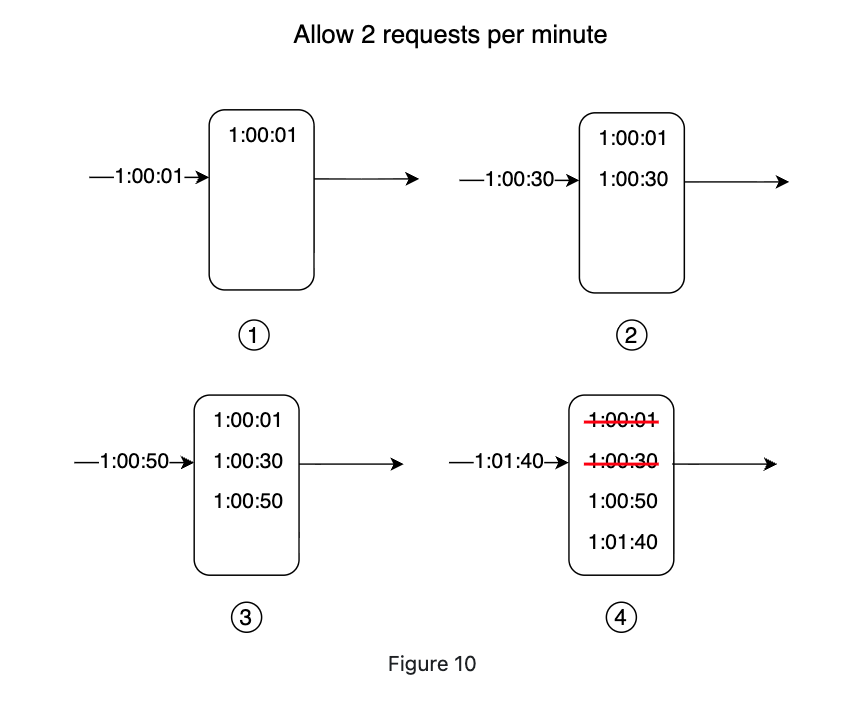
A DDoS attack floods the log with millions of entries per window. The log grows unbounded in memory and every future request must scan/count a huge set. By only inserting allowed requests, the log is capped at limit entries — a constant memory footprint regardless of attack volume.
5.2.Pros and Cons
Pros and Cons
Pros:
- Very accurate — requests never exceed the limit in any rolling window
- Memory-bounded — log holds at most
limitentries when check-before-insert is used
Cons:
- Higher implementation complexity than counter-based approaches
5.3.Redis + Node.js Example
Redis + Node.js Example
6.Sliding Window Counter
Sliding Window Counter
6.1.How It Works
How It Works
A hybrid between Fixed Window Counter and Sliding Window Log. It keeps two adjacent fixed-window counters and interpolates the request count based on how far the current timestamp falls into the current window.
Formula:
Concrete example:
- Limit: 7 requests/min
- Previous minute: 5 requests
- Current minute so far: 3 requests
- Current time is at the 30% mark of the current minute (i.e., window progress = 0.30, so the previous window overlaps by 70%)
The request is allowed (6 < 7). One more request would hit the limit.
Key properties:
- Memory efficient — only two counters needed, not a full log.
- Close approximation; assumes previous window requests are evenly distributed.
- According to Cloudflare experiments, only 0.003% of requests are wrongly allowed or rate-limited among 400 million requests — an acceptable error rate.
6.2.Pros and Cons
Pros and Cons
Pros:
- Memory efficient — only two counters per user
- Smooths out traffic spikes by averaging over the previous window
Cons:
- Approximation only; assumes uniform distribution within the previous window
6.3.Redis + Node.js Example
Redis + Node.js Example
7.System Architecture
System Architecture
7.1.Where to Put the Rate Limiter
Where to Put the Rate Limiter
Rate limiting can be enforced at multiple points:
- Client-side — unreliable; clients can forge requests and you often have no control over the client.
- Server-side middleware — a dedicated rate limiter layer sits in front of API servers.
- API Gateway — in microservice architectures, the API gateway (a managed service) handles rate limiting alongside SSL termination, authentication, and IP whitelisting.
Guidelines for choosing:
- If you own the stack end-to-end, server-side middleware gives full algorithm control.
- If you already have an API gateway for auth/routing, add rate limiting there.
- If engineering resources are scarce, a commercial API gateway is faster than building your own.
7.2.High-Level Architecture
High-Level Architecture
The core idea: use an in-memory store (Redis) to track request counters. Databases are too slow due to disk I/O. Redis provides two key primitives:
INCR— atomically increment a counter by 1.EXPIRE— attach a TTL so counters auto-delete after the window.
Request flow:
- Client sends request to rate limiter middleware.
- Middleware fetches the counter from Redis for the matching bucket (user ID, IP, endpoint).
- If the counter exceeds the limit → return HTTP 429 Too Many Requests.
- Otherwise → forward to API servers and increment the counter in Redis.
7.3.HTTP Headers
HTTP Headers
Clients need to know when they are being throttled and how long to back off. The rate limiter should return these headers:
7.4.Rate Limiting Rules
Rate Limiting Rules
Rules are typically stored as configuration files (e.g., YAML) on disk, loaded by workers into a cache, and read by the middleware at request time.
Lyft open-sourced their rate-limiting component (github.com/lyft/ratelimit) which follows this rule-file pattern.
8.Distributed Environment Concerns
Distributed Environment Concerns
8.1.Race Condition
Race Condition
In a highly concurrent environment, a naive read-check-write is not atomic:
- Thread A reads counter = 3.
- Thread B reads counter = 3.
- Thread A writes counter = 4.
- Thread B writes counter = 4.
The counter ends up at 4 instead of the correct 5 — two requests effectively shared one token.
Solutions:
- Lua scripts — Redis executes Lua scripts atomically, so the read-increment-write happens as a single operation.
- Redis sorted sets — use
ZADD+ZCOUNTwithin a pipeline; sorted set operations are inherently ordered and can be made atomic.
8.2.Synchronization Issue
Synchronization Issue
When multiple rate limiter instances run (horizontal scaling), each instance has its own in-memory state. A client routed to a different instance on each request bypasses per-instance counters entirely.
Wrong approach: Sticky sessions (binds a client to one server) — not scalable.
Correct approach: Use a centralized Redis cluster shared by all rate limiter instances. Every instance reads from and writes to the same counters, regardless of which instance handles the request.
9.Performance Optimization
Performance Optimization
- Multi-data-center / edge nodes — route each request to the geographically nearest edge server to minimize latency. Cloudflare operates 194+ globally distributed edge servers for this purpose.
- Eventual consistency — replicate rate limiter state across data centers using an eventual consistency model. A tiny window of inconsistency is acceptable for rate limiting in exchange for much lower cross-region latency.
10.Monitoring
Monitoring
After deploying a rate limiter, track these metrics to verify effectiveness:
- Drop rate — if too high, rules may be too strict; relax them.
- Pass-through rate during spikes — if abusive traffic still gets through during flash sales or DDoS events, consider switching to Token Bucket (better burst absorption) or tightening the window.
- Latency overhead — the rate limiter should add < 1 ms to response time in the 99th percentile.
11.Additional Considerations
Additional Considerations
11.1.Rate Limiting at Different OSI Layers
Rate Limiting at Different OSI Layers
This article focuses on Layer 7 (HTTP / application layer). Rate limiting can also be applied at:
- Layer 3 (Network / IP layer) — using
iptablesrules to cap packets-per-second from a source IP. - Layer 4 (Transport / TCP) — connection rate limiting at the load balancer level.
11.2.Client Best Practices
Client Best Practices
To avoid being rate-limited:
- Cache responses locally to avoid redundant API calls.
- Respect
X-Ratelimit-Remainingand back off before hitting zero. - Implement exponential backoff with jitter when retrying after a 429.
- Catch 429 responses gracefully rather than crashing.
12.References
References
- Alex Xu, Design A Rate Limiter, bytebytego