






1. Cluster
1.1.Docker-Compose File
Docker-Compose File
1.2.Why KRaft Replaces ZooKeeper
Why KRaft Replaces ZooKeeper
Before Kafka 2.8, every Kafka cluster required a separate ZooKeeper ensemble to function. ZooKeeper was responsible for:
- Electing the active controller (the broker that manages metadata)
- Storing cluster metadata: topic configs, partition assignments, broker registrations, ACLs
- Detecting broker failures via session timeouts
This created several problems:
| Problem | Detail |
|---|---|
| Operational complexity | We had to deploy, monitor, and scale a separate ZooKeeper cluster alongside Kafka |
| Scaling bottleneck | All metadata went through ZooKeeper, which became a bottleneck in large clusters |
| Split-brain risk | Two separate systems (Kafka + ZooKeeper) had to agree on state, introducing edge cases |
| Slow failover | Controller re-election required round-trips to ZooKeeper, slowing recovery |
1.2.1.What KRaft does instead
What KRaft does instead
KRaft (Kafka Raft) embeds a Raft consensus algorithm directly into Kafka itself. The controllers form a quorum and elect a leader among themselves — no external system needed.
- Cluster metadata is stored in an internal Kafka topic (
__cluster_metadata) replicated across all controllers - The active controller is elected via Raft, not ZooKeeper
- Brokers fetch metadata from the controller quorum directly
- Failover is faster because metadata is already replicated in-process
This is why KAFKA_PROCESS_ROLES: broker,controller exists — each node participates in both roles, and KAFKA_CONTROLLER_QUORUM_VOTERS replaces what ZooKeeper's connection string used to do.
KRaft became production-ready in Kafka 3.3 and ZooKeeper mode was fully removed in Kafka 4.0.
1.3.Listener Architecture
Listener Architecture
Each broker has 3 listeners:
| Listener Name | Port | Purpose |
|---|---|---|
PLAINTEXT | 9092 | Inter-broker communication (uses Docker DNS) |
CONTROLLER | 9093 | KRaft controller-to-controller communication |
PLAINTEXT_HOST | 29092/29093/29094 | External access from the host machine |
1.3.1.Why two PLAINTEXT listeners?
Why two PLAINTEXT listeners?
PLAINTEXTadvertiseskafka1:9092,kafka2:9092,kafka3:9092— resolvable only inside DockerPLAINTEXT_HOSTadvertiseslocalhost:9092,localhost:9093,localhost:9094— accessible from the host machine
Without this split, localhost inside a container resolves to that container itself, causing brokers to hit the wrong ports when discovering each other.
1.4.Key Environment Variables
Key Environment Variables
1.4.1.KAFKA_LISTENERS
KAFKA_LISTENERS
Defines which addresses/ports the broker actually binds to and listens on — i.e., what the OS socket listens on.
0.0.0.0 means "accept connections on any network interface". We could restrict to a specific IP, but 0.0.0.0 is typical in containers.
1.4.2.KAFKA_ADVERTISED_LISTENERS
KAFKA_ADVERTISED_LISTENERS
The addresses Kafka publishes to clients via metadata responses. Clients use these to connect after the initial bootstrap.
The critical distinction:
KAFKA_LISTENERS= what the broker actually opens (server-side binding)KAFKA_ADVERTISED_LISTENERS= what the broker tells others to connect to (published in metadata)
If these are mismatched, clients receive an address they can't reach, causing connection failures.
1.4.3.KAFKA_LISTENER_SECURITY_PROTOCOL_MAP
KAFKA_LISTENER_SECURITY_PROTOCOL_MAP
Maps each custom listener name to a security protocol:
Required because PLAINTEXT_HOST is a non-standard name — Kafka won't recognize it without this mapping and will fail to start.
1.4.4.KAFKA_INTER_BROKER_LISTENER_NAME
KAFKA_INTER_BROKER_LISTENER_NAME
Tells brokers which listener to use when talking to each other. Set to PLAINTEXT so brokers use Docker hostnames internally.
1.4.5.KAFKA_CONTROLLER_LISTENER_NAMES
KAFKA_CONTROLLER_LISTENER_NAMES
Tells KRaft which listener is used for controller quorum traffic. Set to CONTROLLER.
1.4.6.KAFKA_CONTROLLER_QUORUM_VOTERS
KAFKA_CONTROLLER_QUORUM_VOTERS
Lists all controller nodes in the quorum:
1.4.7.KAFKA_DEFAULT_REPLICATION_FACTOR in Depth
KAFKA_DEFAULT_REPLICATION_FACTOR in Depth
This setting controls how many brokers will each store a full copy of each partition's messages at creation time. The key constraint is:
If we set KAFKA_DEFAULT_REPLICATION_FACTOR: 4 but only have 2 brokers running, topic creation fails immediately:
This applies regardless of how the topic is created — CLI, Spring NewTopic bean (app startup fails), or auto-creation (produce/consume call fails).
1.4.7.1.What if replication factor is smaller than broker count?
What if replication factor is smaller than broker count?
Perfectly fine. Say we have 5 brokers and replication-factor=3. For a given partition, Kafka picks 3 of the 5 brokers to hold replicas:
Brokers 4 and 5 aren't idle — they serve as partition leaders and replica holders for other partitions of the same (or other) topics.
1.4.7.2.Why not just set it equal to the broker count always?
Why not just set it equal to the broker count always?
For small clusters (3–5 brokers), setting replication factor = broker count is common and reasonable.
For large clusters (10, 50, 100+ brokers) it becomes actively harmful:
- Storage cost multiplies linearly — 50 brokers × replication-factor=50 means 50× our data volume
- Write amplification — every produce call waits for all 50 brokers to acknowledge before returning
- Rebalance cost — ISR tracking becomes expensive when every broker tracks every partition
The industry standard is replication-factor=3 regardless of cluster size. The goal isn't "every broker holds all data" — it's "each piece of data has 3 independent copies." With 100 partitions across 50 brokers at replication-factor=3, each partition is on 3 brokers and the partitions are spread evenly so every broker ends up holding roughly the same total data volume.
1.4.7.3.What happens when a leader broker fails?
What happens when a leader broker fails?
Say partition 0 has leader=broker1, ISR=[broker1, broker2, broker3] and broker 1 crashes:
- KRaft's active controller detects the failure via missed heartbeats
- Controller elects a new leader from the ISR — broker 2 or broker 3
- Metadata is updated cluster-wide; producers and consumers reconnect to the new leader automatically
- Consumers resume from the last committed offset — no messages are lost because ISR replicas were already fully in sync
1.4.7.4.The acks producer setting
The acks producer setting
Whether messages produced just before the crash are lost depends on the producer's acks config:
acks | Meaning | Risk on leader crash |
|---|---|---|
0 | No ack waited | Message may be lost |
1 | Wait for leader ack only | Lost if leader crashes before replicating |
all / -1 | Wait for all ISR acks | No data loss |
acks=all is the safe default for production.
1.5.Leader Election
Leader Election
Kafka has two types of leaders, and the listener config is central to both:
1.5.1.Controller Leader (KRaft quorum leader)
Controller Leader (KRaft quorum leader)
- One of the 3 nodes is elected as the active controller via the Raft consensus algorithm
- Uses the
CONTROLLERlistener (port 9093) exclusively — this is whyCONTROLLERis listed separately and excluded fromKAFKA_ADVERTISED_LISTENERS - The active controller manages all topic/partition metadata and handles partition leader assignments
- Election happens automatically on startup and on failure; determined by which node wins the Raft vote among
KAFKA_CONTROLLER_QUORUM_VOTERS
1.5.2.Partition Leader (per topic-partition)
Partition Leader (per topic-partition)
- Each partition has one broker elected as its leader — producers and consumers always talk to the leader
- The active controller assigns partition leaders based on broker availability and replica placement
- Advertised via metadata: when a client connects to any broker via
--bootstrap-server, that broker returns metadata saying "partition 0 of my-topic is led by kafka2 atkafka2:9092" — the client then connects directly to that address
1.5.3.How listeners tie into leader discovery
How listeners tie into leader discovery
This is why KAFKA_ADVERTISED_LISTENERS must use Docker hostnames (kafka2:9092) for inter-broker traffic, not localhost — only Docker hostnames are resolvable by other containers.
1.6.Port Mapping
Port Mapping
| Host Port | Container Port | Broker |
|---|---|---|
| 9092 | 29092 | kafka1 |
| 9093 | 29093 | kafka2 |
| 9094 | 29094 | kafka3 |
1.7.Partitions vs Replication
Partitions vs Replication
These two settings solve completely different problems and are often confused:
Replication (replication-factor) | Partitioning (partitions) | |
|---|---|---|
| Purpose | Fault tolerance — survive broker failures | Throughput — parallel reads/writes |
| Effect | Data copied across N brokers | Data split into N independent streams |
| Consumer impact | Transparent to consumers | Only 1 consumer per group can read a partition |
1.7.1.Replication does NOT mean standby-only
Replication does NOT mean standby-only
A common misconception is that only 1 broker is active and the rest are on standby. In Kafka, all brokers are active simultaneously — leadership is distributed at the partition level:
Replicas stay in sync (ISR — In-Sync Replicas) and only become leaders on failure.
1.7.2.Fault tolerance with replication-factor=3
Fault tolerance with replication-factor=3
With 3 brokers and replication-factor=3, every partition's data exists on all 3 brokers. The cluster tolerates up to 2 broker failures with no data loss:
1.7.3.When to use 1 partition
When to use 1 partition
Use partitions=1 when:
- Strict global message ordering is required (ordering is only guaranteed within a partition)
- The topic is low-volume (config events, notifications, etc.)
- Only one consumer needs to read the topic at a time
Use more partitions when:
- High throughput is needed (each partition leader can be on a different broker)
- Multiple consumers in a group need to process messages in parallel
Partition count can be increased later but never decreased — start with what we need.
1.8.Topic Default Configuration
Topic Default Configuration
KAFKA_DEFAULT_REPLICATION_FACTOR and KAFKA_NUM_PARTITIONS are broker-level defaults. They only apply when a topic is created without explicit flags:
These settings have no effect on:
- Topics that already exist
- Topics created with explicit
--partitions/--replication-factorflags - Any runtime behaviour of the cluster
2. Producer
2.1.Message Key and Group ID
Message Key and Group ID
2.1.1.Message Key (Producer Only)
Message Key (Producer Only)
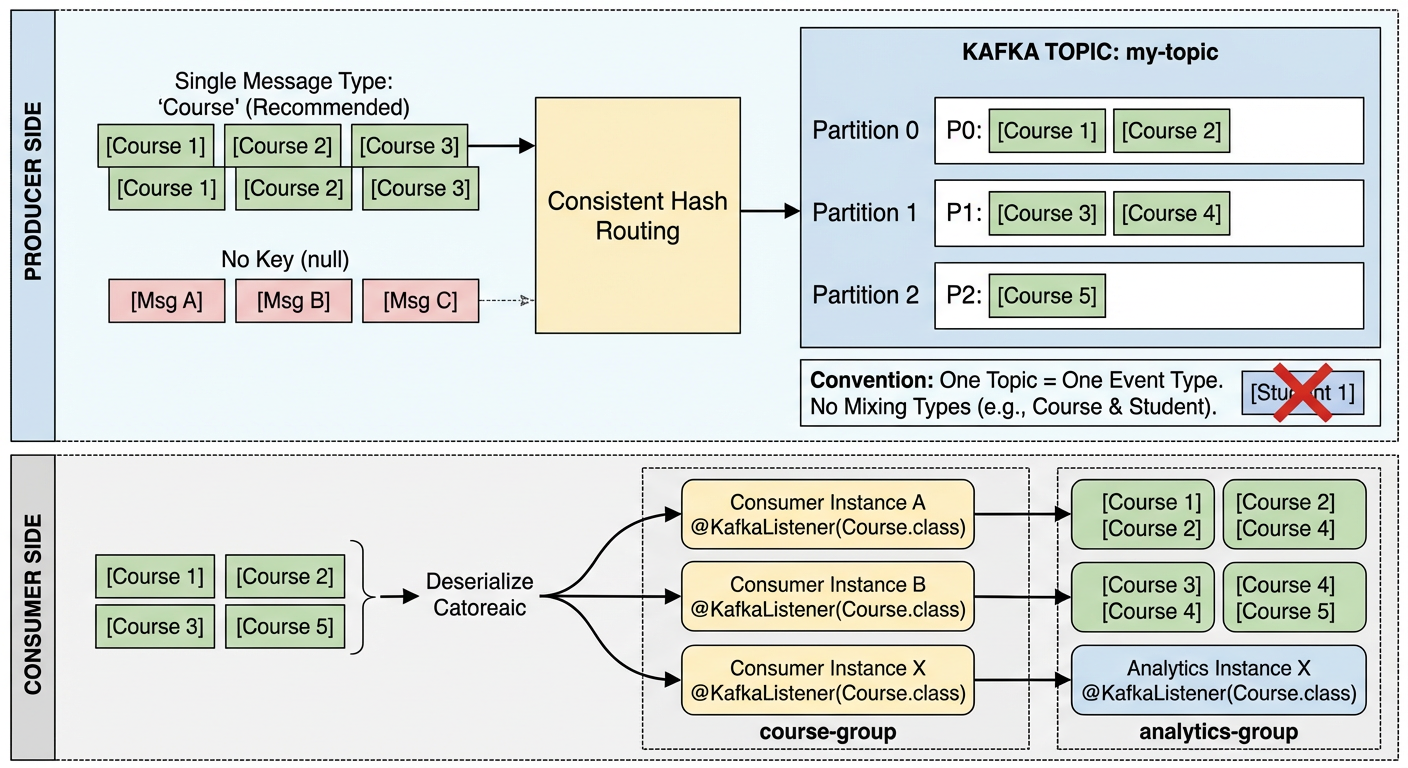
The message key is an optional value sent alongside the message payload when producing. Kafka uses it to route the message to a specific partition via consistent hashing:
All messages with the same key always land on the same partition, which guarantees ordering for that key. If no key is provided, Kafka distributes messages across partitions in a round-robin fashion and ordering is not guaranteed across messages.
Common key choices: a user ID, order ID, or any value where ordering matters.
3. Consumer
3.1.Consumer Group ID (Consumer Only)
Consumer Group ID (Consumer Only)
The consumer group ID identifies a logical group of consumer instances. Kafka uses it to coordinate which consumer owns which partition:
- Each partition is consumed by exactly one consumer within a group at a time
- Different groups each receive all messages independently (fan-out)
- Kafka tracks each group's offset separately so groups don't interfere with each other
Instead of hardcoding the group ID, it can be externalised to application.yml and referenced via a property placeholder:
Spring uses spring.kafka.consumer.group-id as the default when no explicit groupId is set on @KafkaListener.
3.2.Key vs Group ID — side-by-side
Key vs Group ID — side-by-side
| Message Key | Consumer Group ID | |
|---|---|---|
| Set by | Producer | Consumer |
| Purpose | Route message to a specific partition | Coordinate consumers and track offsets |
| Guarantees | Same key → same partition → ordered | Each partition consumed by one member at a time |
| Scope | Per message | Per consumer application |
| Example value | "course", userId, orderId | "course-group", "billing-service" |
Key insight: the message key (
"course") and the group ID ("course-group") are completely independent strings. The key controls where a message is stored; the group ID controls who reads it and where they left off.
3.3.Can a Topic Hold Different Message Types?
Can a Topic Hold Different Message Types?
Technically yes — Kafka itself is schema-agnostic. A topic is just a log of byte arrays; Kafka doesn't enforce or care about message format. We could send JSON on one message and Avro on the next.
In practice though, teams almost always treat a topic as a single logical stream of one message type, for these reasons:
- Consumers deserialize blindly — if we register a
@KafkaListenerwithCourse.class, it will fail or produce garbage when it hits a non-Coursemessage. - Schema Registry (Confluent) — the standard enterprise pattern is to attach a schema to each topic and reject messages that don't conform.
- Ordering guarantees are per-partition — if we mix types, ordering semantics become meaningless.
The conventional rule is: one topic = one event type. If we need to publish Course and Student events, use course-topic and student-topic separately. Fan-out (multiple consumers receiving all messages) is achieved through consumer groups, not by multiplexing types into one topic.
3.4.spring.json.trusted.packages
spring.json.trusted.packages
3.4.1.Why do we need Trusted Packages?
Why do we need Trusted Packages?
When a Kafka consumer deserializes a JSON message back into a Java object, Spring uses JsonDeserializer under the hood. By default it refuses to deserialize any class that isn't in an explicitly trusted package — this is a security guard against deserialization attacks, where a malicious producer could send a crafted payload that instantiates an arbitrary class on the consumer side.
This setting tells the JsonDeserializer: "only instantiate classes from this package when deserializing". Without it, we would get a runtime error:
3.4.2.Common patterns
Common patterns
| Value | Meaning |
|---|---|
"com.machingclee.kafka.common.type" | Only trust that specific package |
"com.machingclee.*" | Trust all subpackages under com.machingclee |
"*" | Trust everything (convenient but removes the security benefit) |
3.5.ErrorHandlingDeserializer — Graceful Deserialization Failures
ErrorHandlingDeserializer — Graceful Deserialization Failures
By default, if a bad message arrives and JsonDeserializer throws a SerializationException, the listener container crashes and stops processing. Wrapping it with ErrorHandlingDeserializer catches that exception and routes the failed record to an error handler instead, keeping the consumer alive.
3.5.1.application.yaml
application.yaml
Key properties:
| Property | Purpose |
|---|---|
value-deserializer | Set to ErrorHandlingDeserializer as the outer wrapper |
spring.deserializer.value.delegate.class | The actual deserializer (JsonDeserializer) delegated to internally |
spring.json.trusted.packages | Packages the deserializer is allowed to instantiate |
spring.json.value.default.type | Target class to deserialize JSON into — without this, JsonDeserializer doesn't know what type to produce |
3.5.2.Course.java — no-arg constructor required
Course.java — no-arg constructor required
Jackson (used internally by JsonDeserializer) requires a public no-arg constructor to instantiate the target class during deserialization:
Without it, deserialization fails with an InvalidDefinitionException even if the JSON is perfectly valid.
3.5.3.What these two changes achieve together
What these two changes achieve together
ErrorHandlingDeserializercatches anySerializationExceptiongracefully — the listener container stays running and the bad message can be logged or sent to a dead-letter topic- The no-arg constructor on
CourseensuresJsonDeserializercan properly map incoming JSON to aCourseobject
3.6.Does One Spring App = One Consumer Group?
Does One Spring App = One Consumer Group?
Not necessarily.
A single Spring application can have multiple @KafkaListener methods with different groupId values, making it participate in multiple consumer groups simultaneously:
The group-id in application.yml sets the default group ID used when @KafkaListener doesn't specify one explicitly:
In practice the common pattern is one application = one consumer group because:
- Each microservice has a single responsibility and thus a single consume-behaviour
- Mixing multiple group IDs in one app makes offset tracking and scaling harder to reason about
- Horizontal scaling works cleanly when all instances of the same app share the same
group-id— Kafka automatically distributes partitions across them
So the YAML default being a single group-id reflects the typical deployment model, not a hard limitation.
3.7.Who is the Group Coordinator?
Who is the Group Coordinator?
The Group Coordinator is a specific Kafka broker — not KRaft, not a separate service. Kafka picks it by hashing the consumer group ID against the internal __consumer_offsets topic:
Whichever broker owns that partition of __consumer_offsets becomes the Group Coordinator for our group-id. It's just a regular broker wearing an extra hat.
3.7.1.What happens when a third instance joins?
What happens when a third instance joins?
Say we have 3 partitions, 2 consumer instances running (instance 2 owns partition 1 and partition 2), and instance 3 now starts up:
3.7.2.Two roles, one flow
Two roles, one flow
| Role | Who | Responsibility |
|---|---|---|
| Group Coordinator | A broker (determined by hash(group-id)) | Detects membership changes, triggers rebalance, distributes final assignments |
| Group Leader | The first consumer that joined the group | Computes the actual partition → consumer mapping and sends it back to the coordinator |
Key points:
- Instance 2 doesn't "push" partition 2 anywhere — it simply stops claiming it after the rebalance signal
- Instance 3 resumes exactly from the last committed offset of partition 2 (whatever instance 2 last committed)
- KRaft is not involved — it only manages broker/cluster metadata, never consumer group state
3.8.What if Consumers Outnumber Partitions?
What if Consumers Outnumber Partitions?
The same rebalance process triggers when a 4th instance joins — but since there are only 3 partitions, one consumer ends up with nothing:
Instance 4 is still fully connected — it sends regular heartbeats to the Group Coordinator and is a registered group member. It just has no partition to consume from.
3.8.1.Why keep it connected at all?
Why keep it connected at all?
It acts as a hot standby. If Instance 2 crashes, the Group Coordinator detects missed heartbeats, triggers a rebalance, and Instance 4 steps in immediately:
No messages are lost — Instance 4 picks up exactly where Instance 2 left off.
3.8.2.The rule
The rule
Any consumer beyond the partition count is idle but ready. Scaling consumers past the partition count gives no throughput benefit — to get more parallelism we must first increase the partition count.
3.9.Does Kafka Auto-Create Topics?
Does Kafka Auto-Create Topics?
Yes — by default. Kafka brokers have auto.create.topics.enable=true, so when our consumer (or producer) first references a topic that doesn't exist, the broker creates it automatically using the broker-level defaults:
This is why simply launching a consumer with @KafkaListener(topics = "my-topic") works without any prior setup.
3.9.1.The problem with relying on auto-creation
The problem with relying on auto-creation
We have no control over the partition count at creation time. If we later need 6 partitions for throughput, auto-creation already gave us 1 — and partition count can never be decreased, only increased.
3.9.2.The recommended approach — declare a NewTopic bean
The recommended approach — declare a NewTopic bean
Spring Kafka will create (or verify) the topic on startup if we register a NewTopic bean:
This is idempotent — if the topic already exists with the right config it does nothing; if it doesn't exist it creates it. This is the safe, production-friendly pattern.
3.9.3.Summary
Summary
| Approach | Topic created? | Partition control? |
|---|---|---|
| Auto (broker default) | Yes, on first use | No — uses broker defaults |
CLI kafka-topics.sh | Yes, explicitly | Full control |
Spring NewTopic bean | Yes, on app startup | Full control |
3.10.Common Commands
Common Commands
3.10.1.Start / Stop
Start / Stop
3.10.2.Enter a broker container
Enter a broker container
3.10.3.Topic Management
Topic Management
3.10.3.1.List all topics
List all topics
3.10.3.2.Create a topic (using broker defaults)
Create a topic (using broker defaults)
3.10.3.3.Create a topic (with explicit settings)
Create a topic (with explicit settings)
3.10.3.4.Describe a topic
Describe a topic
Output fields:
- Leader — broker currently handling reads/writes for that partition
- Replicas — all brokers holding a copy
- Isr — In-Sync Replicas: brokers fully caught up with the leader
3.10.3.5.Delete a topic
Delete a topic
3.10.4.Producing & Consuming
Producing & Consuming
3.10.4.1.Produce messages (interactive)
Produce messages (interactive)
3.10.4.2.Consume messages (from latest)
Consume messages (from latest)
3.10.4.3.Consume messages (from beginning)
Consume messages (from beginning)
3.10.5.Consumer Groups
Consumer Groups
3.10.5.1.List consumer groups
List consumer groups
3.10.5.2.Describe a consumer group (shows lag)
Describe a consumer group (shows lag)
3.10.6.--bootstrap-server flag
--bootstrap-server flag
Points the CLI to an initial broker to fetch cluster metadata. Only one address is needed to discover the full cluster, but listing multiple provides redundancy if one broker is down: