




1. Permissions via Bitwise Flags
First we need to know the meaning of the following bitwise flags:
So a number 6 = 4 + 2 means READ and WRITE, which is also represented by O_RDWR in C.
Usually a permission to a file is represented by the combination owner-group-usr format, for example:
In mac this number is actually owner-staff-others, we can check all the groups in our system via command groups, by which I get
All the users that can log into this mac machine are classified into staff. The following are not of group staff:
root(superuser) - in wheel groupnobody- unprivileged account_www- web server user_mysql- database user_spotlight- spotlight indexing_windowserver- window server process- And many other
_prefixed system accounts
2. ls -l
ls -lNow an ls -l (l stands for long format) command to a file gives
Which shows that this file has mode number 0644, with the group staff being 4 and with other matadata.
In C we cannot omit 0 as it tells the compiler this number is in octal format.
But in other linux command such as chmod 644 some_file.sh the omission is acceptable because the command is written smart enough to assume octal when you give it a 3-digit number.
Files downloaded from the internet are by default 0644. That's why sometimes we need to explicitly execute chmod 0744 to make a script executable.
3. Formatting in VSCode
In settings.json:
4. List in C
We can declare an array in either way:
In mose cases list (an array in the second line) will be decayed to a pointer, the commonly used expression list[2] actually means:
5. Compile Modules
5.1.Intermediate Object Files
Intermediate Object Files
Consider the following project structure:
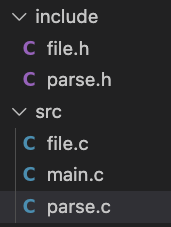
We compile intermediate object file one by one by:
Here by the flag -c (compile only), we ask gcc to stop after compilation stage and don't do the linking.
By linking we mean: The final stage that combines multiple object files (.o) and resolves all references to create an executable.
What linking does:
-
Combines object files - merges
main.o,utils.o,logger.ointo one executable -
Resolves symbols - connects function calls to their actual implementations
-
Includes libraries - links standard library functions (printf, malloc, etc.)
-
Fixes addresses - determines final memory addresses for functions and variables
5.2.Compile Modules into an Executable
Compile Modules into an Executable
We repeated the step above 3 times:
Then we obtain all object files:
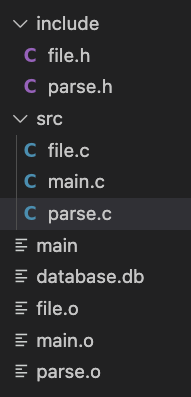
Create a bin/ directory and combine all the object files into one binary:
Now we test the binary and obtain:

6. Makefile
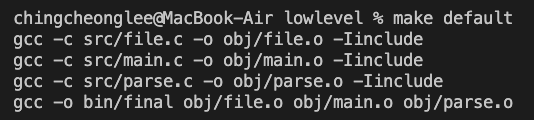
The steps in 〈5.2. Compile Modules into an Executable〉 can be further simplified by Makefile and Pattern Rules.
-
default,clean, etc are called rules, they are executed viamake(equivalent tomake default),make cleanetc -
$(TARGET)is called a make variable -
defaultrule is now asked to execute the$(TARGET)rule, this is simply a rule that has a variable name -
When
$(TARGET)rule is being executed:-
By definition
$(TARGET): $(OBJ)means$(OBJ)is a dependency (list) of$(TARGET)rule; -
It tries to find whether the object file in
$(OBJ)exists, if not it tries to find any pattern rule that match files in$(OBJ); -
Pattern rule
obj/%.ogets executed repeatedly; -
When all pattern rules are done,
$(TARGET)rule goes further togcc -o $@ $?, where$@is the target name, and$?$is a name in$(OBJ);
-